


Dreamcore & Weirdcore Maker
3.062.00 Reviews
App Specs
- Version
- 1.0.9
- Updated On
- License
- Free
- Downloads
- 1,000,000+
- Developer
- Revivoskin
- Categories
- Art & Design
- Platform
- Android
Screenshots
 Analysis by AppCompare
I find that creative apps are easiest to judge when I have a particular image in mind, rather than when I’m tapping around without a goal. With Dreamcore & Weirdcore Maker, that goal might be turning a familiar photo into something uncanny, or building an avatar that feels more like a half-remembered dream than a standard profile picture. It is a free art-and-design app from Revivoskin, and its focus is narrow in a useful way: making surreal visuals without asking you to begin in a general-purpose editor.
That focus shapes both the appeal and the limits. If you want a quick creative starting point for an unusual avatar, the app is worth exploring. If you need precise photo retouching, a broad illustration workspace, or predictable access to every editing step regardless of your connection, I would look at other tools first. I would treat it as a playful specialist rather than a replacement for a full design suite.
Where a connection can shape the session
Creative work on a phone often happens in short bursts: I might start an edit while waiting for someone, then return to it later at home. In an app centered on templates, sharing, and social activity, those moments may not all behave alike when connectivity changes. I would plan to use a reliable connection when exploring community material or sending a finished image outward, and avoid assuming every part of the experience is available without one.
That is less a complaint than a practical way to avoid interrupting a good idea. If I am heading out, I would decide on a visual direction before leaving: pick a subject, settle on a mood, and keep the edit simple enough to finish in one sitting. A network-sensitive step at the wrong moment can break concentration, so it helps to separate the making from the sharing rather than treating them as one continuous task.
Creating Your Dreamy World
When I first opened Dreamcore & Weirdcore Maker, I was greeted by an intuitive interface that immediately drew me in. The app offers an easy-to-navigate layout, which is a blessing if you're not exactly tech-savvy. You can dive straight into creating without feeling overwhelmed by complex tools.
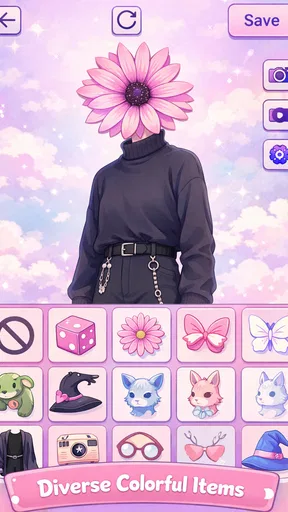
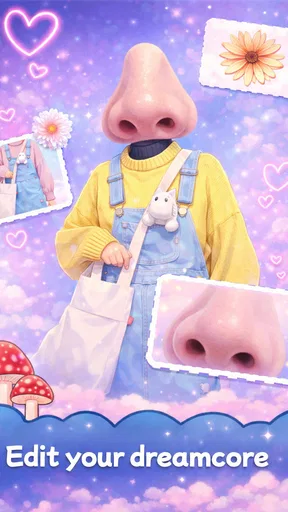
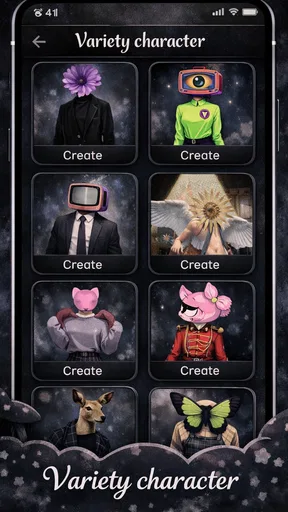
The app is packed with a variety of features that allow you to explore and experiment. From dreamy filters and bizarre overlays to trippy animations, it has everything you need to transform ordinary photos into extraordinary pieces. It's like having a mini Photoshop, but specifically tailored for us dreamcore and weirdcore enthusiasts.
Making a small screen work for you
On a phone, the challenge is not only choosing an effect; it is noticing when an image has become too busy. I get better results by starting with one clear subject and one visual idea, then adding effects only when they strengthen that idea. For a profile avatar, a face or silhouette needs to remain recognizable at thumbnail size. For a mood-board image, I can be less restrained because the point is atmosphere rather than instant readability.
Worth Reading Before You Choose

EA SPORTS FC Mobile 26 Is a Bigger Football Game, but It Takes Time

Flipboard Shows What News Apps Must Do Beyond the Feed

Switching to Android Auto Means Rethinking Your Driving Routine

Google Calendar Makes a Crowded Week Easier to Manage

Ludo King Makes the Most of the Minutes Between Plans

Baby Panda World Brings Quick Play to Modern Phones, but Its Game Library Feels Busy
A practical everyday use is making a new avatar from a photo I already like, rather than trying to create a polished artwork from scratch during a spare minute. I would make a first pass, pause, and check the result at the size where it will actually appear. That quick check catches a common mobile-editing problem: details that look striking when zoomed in can collapse into visual noise when the image is small.
Endless Customization
What I absolutely love about this app is the level of customization it offers. You can adjust colors, play with patterns, and even add glitch effects to give your images that perfect surreal vibe. The layering options are particularly impressive, letting you stack effects to create something truly unique.
For more control, I would build the image in stages instead of piling everything on at once. First establish the mood with color, then add a pattern or overlay, and reserve a glitch treatment for a detail that benefits from disruption. This order makes it easier to see which choice is doing useful work. If the subject disappears, removing one layer is often better than compensating with several more.
That workflow also helps when I want a small set of related images. I can keep the same basic palette and visual motif while changing the subject or intensity, so the results feel connected without being duplicates. It is a handy approach for a matching profile image and banner, or for a few posts that should share a mood. The trade-off is that a themed set takes deliberate consistency; random effects can make each piece feel as if it belongs to a different project.
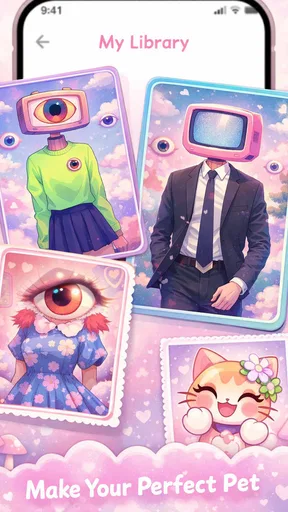
And if you're like me, always looking for inspiration, the app has a gallery of premade templates. These templates are a great way to jumpstart your creativity, especially on days when you're feeling a bit uninspired. You can tweak them to your heart's content, ensuring your work remains uniquely yours.
Templates as a starting point, not a finished style
I would use a template to answer a specific question—perhaps whether a hazy color treatment suits a photo—not as a shortcut to a distinctive result by itself. A useful tip is to change the element that matters most to your idea first, such as the palette or the balance between subject and background. If I only make tiny adjustments, the final image may still feel like a template with a different photo in it.
Templates are also useful when time is limited, but they can narrow your choices if you browse them for too long. I would pick one that is close to the mood I want, make a few intentional changes, and stop when the image communicates clearly. For a more exact composition or a visual identity that must match strict brand guidelines, a conventional editor gives me more dependable control than a style-led maker.
Sharing, feedback, and the role of connectivity
One of the highlights of the Dreamcore & Weirdcore Maker is its vibrant community. The app encourages sharing your creations, and you can easily upload your masterpieces to various social media platforms directly from the app. It's a fantastic way to connect with like-minded individuals and get feedback on your work.
There are frequent challenges and contests that you can participate in. These not only push your creative boundaries but also offer a chance to get featured, which is pretty cool if you ask me. It's a supportive space where creativity is celebrated.
Social features make a difference only if I actually want an audience for what I make. If I am experimenting privately, I can focus on the image and leave posting for later. When I do share, I would check the final crop and preview first, especially if the image is meant to work as an avatar or a square post. A striking composition can lose its focal point when displayed in a different shape.
Connectivity also changes how I think about data use. Browsing visual material and uploading finished work can involve more network activity than simply making a few local adjustments, so I would use Wi-Fi for extended browsing or repeated sharing when mobile data is limited. This is a sensible habit, not a claim about the app’s exact data use. It also gives me a moment to decide whether I want to publish an image at all, rather than sending every experiment straight to a social account.
Who will enjoy this focused style
I think the app makes most sense for people who already like dreamlike, eerie, or deliberately imperfect imagery and want an approachable way to explore that look. It can suit someone making a personal avatar, a themed social post, or a visual prompt for a collage. Beginners may appreciate having a focused creative direction instead of facing the open-ended blank canvas of a general editor.
I would skip it if my main job were careful product photography, clean typography, detailed drawing, or consistent commercial layouts. Those tasks need controls and workflows that a specialist surreal-image app is not designed to replace. Likewise, someone who dislikes stylized effects may find its central appeal too specific. In those cases, a standard photo editor or illustration app is a better fit, even if it takes more effort to create a weirdcore look from scratch.
Performance and Usability
Now, let's talk about how the app performs. I tested it on both Android and iOS devices, and it runs smoothly on both. I didn't encounter any noticeable lags or crashes, which is always a plus when you're deep in the creative zone.
The app is lightweight, so it doesn't hog your device's resources, which means you can work on your creations without any annoying interruptions. The developers have done a commendable job in ensuring that the user experience is seamless and enjoyable.
When something interrupts the flow
Even a smooth editing session can be disrupted by a weak connection when moving from creation to online activity. If a template, community area, or sharing step does not load as expected, I would first check the connection and retry that action before rebuilding the image. Keeping the edit itself simple until I know the next step is available can prevent wasted effort, especially when I am using the app on the move.
I would also make a habit of checking that a finished image has reached its intended destination before closing the session. That is ordinary caution for any app that hands work off to another service, not a guarantee about how this one saves or queues content. If a post matters, I would keep the source image available until I can see that the share completed successfully.
What to expect before installing
The app has a 3.1 average from around 876 ratings, so I would approach it with realistic expectations rather than assuming every person will find the same level of polish. It has passed 500,000 installs, but popularity does not settle whether its particular aesthetic suits you. The current version is 1.0.9, and it is rated for Everyone; the listed minimum Android requirement is version 7.0.
Those details make it easy to judge the basic fit, but I would still think about how I plan to use it. The download is free, which lowers the barrier to trying its style, yet the value depends on whether I enjoy making surreal images often enough to keep it around. I would install it for a specific experiment—an avatar, a strange edit, or a themed post—then decide whether its focused tools deserve a regular place in my creative routine.
Final Thoughts
In my opinion, Dreamcore & Weirdcore Maker is a must-have for anyone who loves to experiment with visuals. It's a fun and accessible way to dive into the weird and wonderful world of dreamcore aesthetics. Whether you're a seasoned artist or just someone looking to try something new, this app offers plenty of tools to play with.
So, if you're ready to let your imagination run wild, give this app a shot. It's available for download on both Android and iOS, and trust me, you won't be disappointed. Happy creating!
My connectivity verdict
For me, the best way to approach this app is as a focused creative tool with online moments around discovery and sharing, rather than as something I would rely on for a fully uninterrupted session in every setting. A steady connection is useful when I want to explore community activity or send a finished piece out; for a quick visual experiment, I would keep the task modest and avoid depending on an online step at the last moment.
That balance is why I would recommend trying it to someone who enjoys surreal avatars and mood-led edits, especially if they like sharing experiments with a community. I would not choose it as my only editor for detailed or professional work, and I would be thoughtful about when I browse or upload on mobile data. Used with those expectations, it offers a clear creative lane—and a good reason to turn an ordinary photo into something a little stranger.
Pros
- Unique and creative design options.
- Easy-to-use interface for beginners.
- Extensive library of elements.
- Regular updates with new content.
- Supports high-resolution exports.
Cons
- Limited free features.
- Occasional in-app ads.
- Requires internet for full access.
- Some elements need purchase.
- No offline editing available.
FAQs for Dreamcore & Weirdcore Maker
What is Dreamcore & Weirdcore Maker and what can I create with it?
Dreamcore & Weirdcore Maker is an innovative app that allows users to create surreal and dream-like visuals using a variety of tools and features. You can design unique images that blend reality with absurdity, perfect for artistic expression or social media sharing. It's ideal for those who enjoy exploring the boundaries of conventional art.
Is Dreamcore & Weirdcore Maker user-friendly for beginners?
Yes, Dreamcore & Weirdcore Maker is designed to be intuitive, with a user-friendly interface that accommodates both beginners and experienced users. The app provides tutorials and tips to help newcomers get started, making it easy to navigate and create stunning visuals right from the start.
What features does Dreamcore & Weirdcore Maker offer?
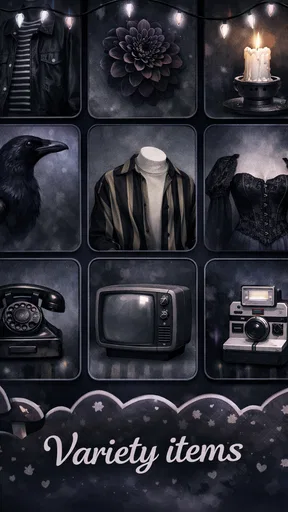
The app offers a wide range of features including customizable templates, a rich library of surreal elements, filters, and effects. Users can layer images, adjust colors, and apply unique textures to create dream-like scenarios. It also supports high-resolution exports for professional-quality artwork.
Are there in-app purchases or subscriptions required?
Dreamcore & Weirdcore Maker offers a free version with basic features. However, to unlock advanced tools and premium content, users can opt for in-app purchases or subscribe to a monthly plan. The subscription enhances the creative experience but is not necessary for basic use.
Can I share my creations directly from the app?
Yes, Dreamcore & Weirdcore Maker allows users to share their creations directly to social media platforms like Instagram, Facebook, and Twitter. The app also provides options to save your artwork in various formats, making it easy to showcase your work wherever you choose.


